Create videos with AI
and edit them free.
Type a topic or paste an article URL: Vaideo writes the script, narrates it with an AI voice, finds the images and edits the video with captions. Then, if you like, fine-tune it CapCut-style in Vaideo Editor, free and in your browser.
No card for the free plan · Images from Unsplash, Wikimedia or AI
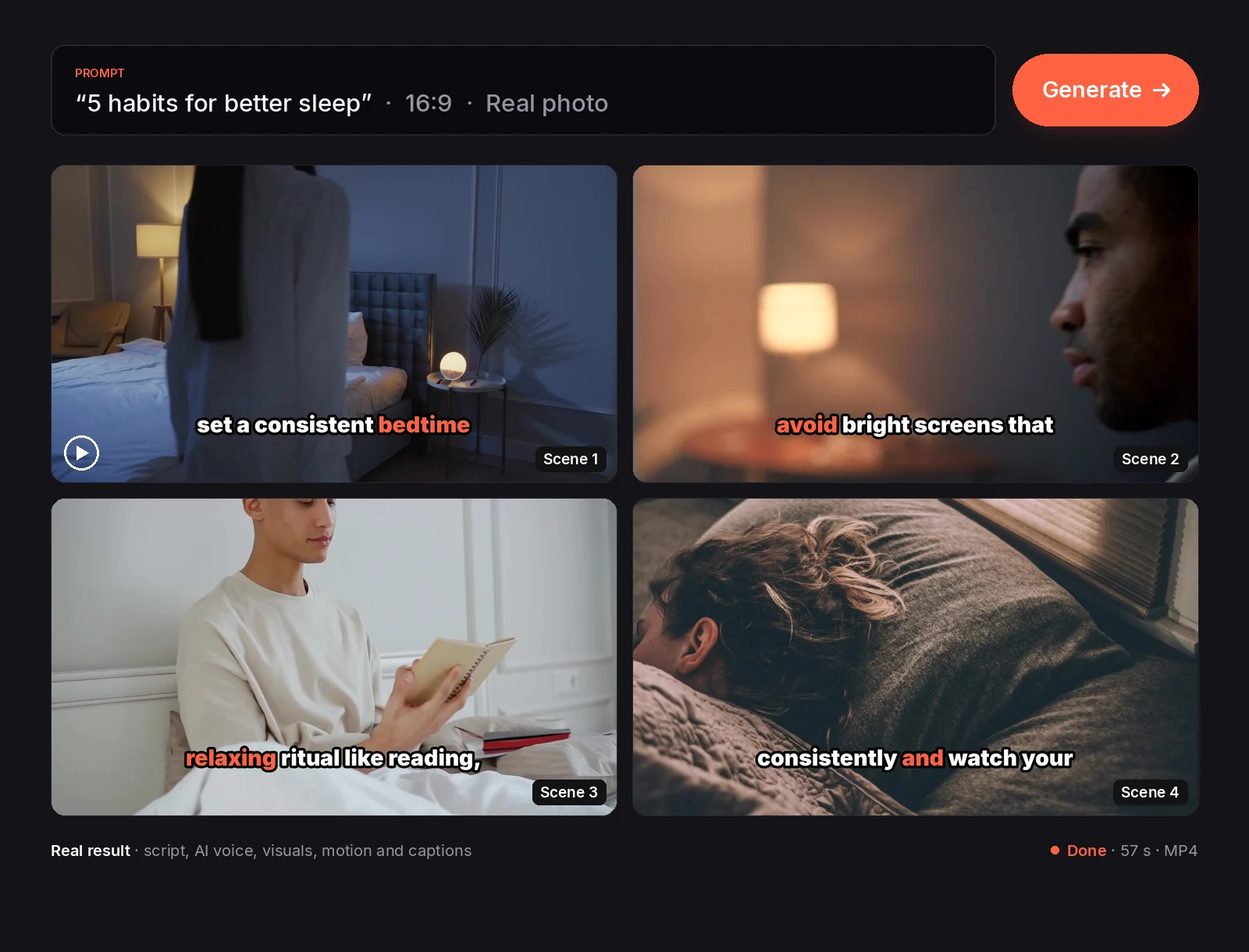
This was made with Vaideo
One prompt, two minutes, ready-to-publish video. No manual editing, no camera, no learning curve.
Video fully generated with Vaideo · Imagery via Unsplash
How it works
Three steps. No editing skills needed.
Write your prompt
Tell Vaideo what the video is about or paste an article URL. One sentence is enough: “5 habits for better sleep”, “the history of coffee”…
Script, voice and images
AI writes a scene-by-scene script, narrates it with a natural voice in English or Spanish and finds free stock images (or generates them with AI) in the style you choose.
Video ready
Automatic edit with zoom, pan and animated captions. Review it, swap any scene's image and download the MP4, upload it to YouTube or open it in Vaideo Editor to fine-tune it.
New · From an article
Already written it? Turn it into a video
Paste the link to a post, a news story or a newsletter. Vaideo summarises it with your own ideas and facts, narrates it with an AI voice and builds it with the article's own images.
- ✓No copied sentences: the script is rewritten
- ✓Uses the article's images; gaps filled with stock or AI
- ✓9:16 or 16:9, with captions
New · Vaideo Editor
Create with AI, edit like in CapCut. Free.
Vaideo Editor is a timeline video editor that runs in your browser. It opens any AI-made video in separate tracks (video, voice and captions), or you can start from your own clips, audio and images.
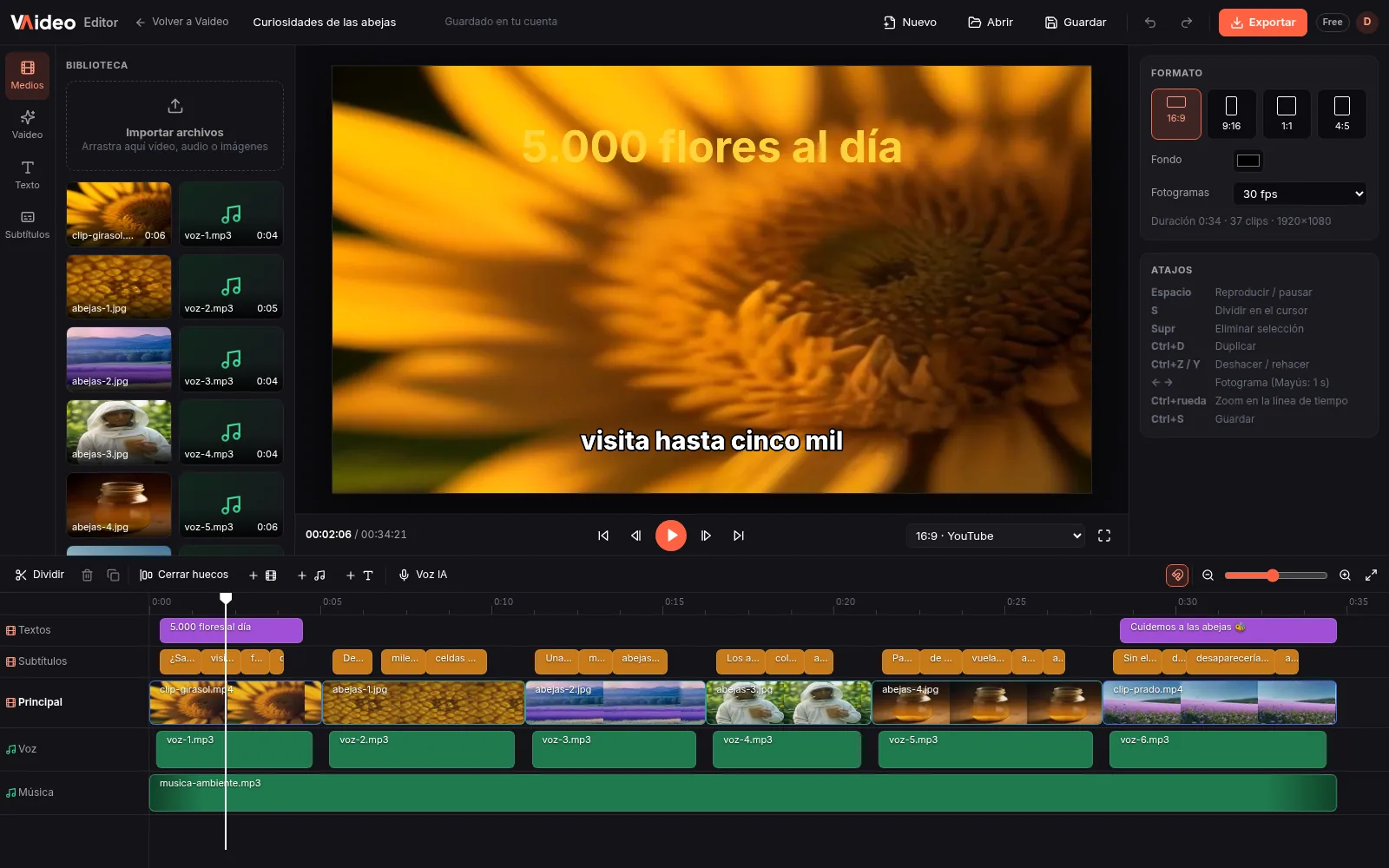
Cut and assemble
Split, delete, duplicate and close gaps. Undo and redo.
Text and captions
Text layers and a global caption style. Fix the captions the AI generated.
Your audio
Audio tracks with volume up to 200%, mute and fades. Add your music or your voice.
Speed and colour
From 0.25x to 4x. Brightness, contrast, saturation, exposure, temperature and tint.
Any format
16:9, 9:16, 1:1 and 4:5 canvases, with scale, position, rotation and opacity.
Export MP4
Up to 1080p free, 2K and 4K with Unlimited. What you upload exports with no watermark.
Works on computers (900 px screen or wider), not on phones. Upload files up to 2 GB with a free account. No templates, music library or transitions yet.
Features
What you need to publish more, no editing skills needed
Actually fast
A finished video in a few minutes (2-6 is typical) from your prompt. The AI does the edit; if you want to change something, open it in Vaideo Editor.
Free stock or AI images
Unsplash and Wikimedia built in, or AI-generated images. 10 visual styles and scene-by-scene image swaps.
Animated captions
Burned-in captions synced to the narration, made to work with the sound off.
Natural AI voice
Narration with a natural AI voice in English or Spanish, generated scene by scene.
Vertical or horizontal
9:16 for Shorts, Reels and TikTok or 16:9 for YouTube. Up to 30 s free, 5 min with packs and 10 min on Unlimited.
Download or publish
Download the MP4 or, on the Unlimited plan, connect your YouTube channel and upload directly. AutoPilot publishes to your channel for you.
Ideas to start creating viral videos
Pick the angle that fits your goal. Each landing explains how Vaideo solves that specific pain point.
Free and zero cost
Fast and in bulk
For every social network
No camera, no editing
By niche
Pricing
Start free. Pay only for the videos you need.
Unlimited at €39 (was €49)
and one-off packs from €5
Packs are a one-off payment, no subscription, and videos never expire.
🌎 Signing up from Latin America? An extra 40% off every pack: from €3.
Free
Try Vaideo with no commitment.
No card needed
- ✓1 free video a day
- ✓Up to 30 seconds
- ✓720p resolution
- ✓Vaideo watermark
- ✓Generated in turns: you wait your turn in the queue
Video packs
Buy the videos you need, when you need them.
One-off payment · never expire
Up to €15 less than in packs of 5
- 5 videos€5
- 15 videos€12
- 40 videos€25
- ✓No watermark
- ✓Up to 5 minutes · 1080p
- ✓Pro AI voices
Unlimited
-20%Most powerfulFor publishing daily and automating your channel.
Billed monthly
Save €10 a month
- ✓Unlimited videos (fair use)
- ✓No queue: your video starts right away
- ✓Up to 10 minutes
- ✓1080p resolution
- ✓2K and 4K export in Vaideo Editor
- ✓No watermark
- ✓Direct YouTube upload
- ✓AutoPilot: automatic videos published to your channel
✓ Vaideo Editor free for everyone · 2K and 4K with Unlimited
Packs are a one-off payment and never expire. Cancel Unlimited anytime. Failed videos aren't used up.
FAQ
Frequently asked questions
Do I need editing skills?+
No. Vaideo does the full edit: you just write the prompt. And if you want to tweak it, Vaideo Editor (free) opens it in tracks to trim, fix captions or add your logo.
Where do the images come from?+
From Unsplash and Wikimedia (free image libraries), or AI-generated if you turn that on. Unsplash images can be used commercially; some Wikimedia ones require attribution, so check them.
Can I change the images?+
Yes. You can replace the image of any scene and set a style hint for all of them. And if you want to use your own clips, audio or images, open the video in Vaideo Editor (free) and add them on the timeline.
Which languages does it narrate in?+
English and Spanish, with one natural AI voice per language. The script is written directly in the language you pick.
How do I cancel?+
From Settings → Account → “Manage subscription”. No lock-in: you keep Unlimited until the end of the paid period. Packs are a one-off payment: nothing to cancel.
What if I want to start from a video that already exists?+
Upload it to Vaideo Editor, free: you can trim it, add text and your own audio, change the format and export an MP4 with no watermark. If you want to dub a viral video or clone its motion onto your own image, that's what our sister tool does: MotionClone
Your first video, in minutes
Create a free account and make 1 free video a day, no card. When you need more, watermark-free video packs from €5 or Unlimited at €39/month.
Create free account